$SEPARATOR home
$SEPARATOR interests
$SEPARATOR razr
$SEPARATOR
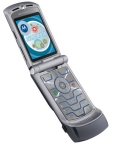 I use Verizon Wireless as my wireless carrier. They've been decent, and the coverage is the
best for the Washington, D.C. area. So I used a 2-year- upgrade credit and got a new
Motorola RAZR V3c for really cheap. It's a nice phone; it weighs almost
nothing. The coolest new feature is its bluetooth connectivity that I can use with
my PowerBook to sync contact and calendar entries. I was so fed up with my older
phone because it had its own list of contacts, and was a pain to update that manually along
with my 'master' address book entries on the PowerBook. Now it just syncs without any
wires. It also has a camera and I can transfer files to and from with bluetooth as well.
I use Verizon Wireless as my wireless carrier. They've been decent, and the coverage is the
best for the Washington, D.C. area. So I used a 2-year- upgrade credit and got a new
Motorola RAZR V3c for really cheap. It's a nice phone; it weighs almost
nothing. The coolest new feature is its bluetooth connectivity that I can use with
my PowerBook to sync contact and calendar entries. I was so fed up with my older
phone because it had its own list of contacts, and was a pain to update that manually along
with my 'master' address book entries on the PowerBook. Now it just syncs without any
wires. It also has a camera and I can transfer files to and from with bluetooth as well.
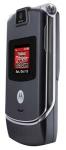 So, those features are all well and good, but I can't help really tinkering with any
new toy I get. So, after a day of googling and joining/reading various RAZR forums around,
I figured out how to use some software tools (including a hex editor) to hack some
changes. For one, there was this annoying text on the screen that said \"Verizon Wireless\".
I was already paying them enough; I didn't need to give them any more attention, so that
text had to go. Also, on the outside LCD panel, when the phone is open, there was a
Verizon logo image. Not any more. Next I'll be changing the startup/shutdown animation
to get rid of that stupid V-cast advertisement. So, for any geek that loves to hack
stuff, the RAZR is a great phone.
So, those features are all well and good, but I can't help really tinkering with any
new toy I get. So, after a day of googling and joining/reading various RAZR forums around,
I figured out how to use some software tools (including a hex editor) to hack some
changes. For one, there was this annoying text on the screen that said \"Verizon Wireless\".
I was already paying them enough; I didn't need to give them any more attention, so that
text had to go. Also, on the outside LCD panel, when the phone is open, there was a
Verizon logo image. Not any more. Next I'll be changing the startup/shutdown animation
to get rid of that stupid V-cast advertisement. So, for any geek that loves to hack
stuff, the RAZR is a great phone.
Another great feature is that I can take a picture with the camera on the phone, then
email that picture from the phone. I use Flickr
to post some of my current-event photos,
and they have a setup where you can email pictures to a certain account and
 the images will be automatically posted in your Flickr stream. w00t! Click
here
to see just the RAZR-tagged photos I have up at Flickr.
the images will be automatically posted in your Flickr stream. w00t! Click
here
to see just the RAZR-tagged photos I have up at Flickr.
But it's just a cell phone. I mean, seriously.
links
";
EndPage();
?>